Key takeaways
- An MVP is the smallest product that lets real users complete one valuable job. It is not a cut-down version of everything you imagined.
- Eight weeks is realistic when scope is fixed around one core workflow and decisions are made within a day or two.
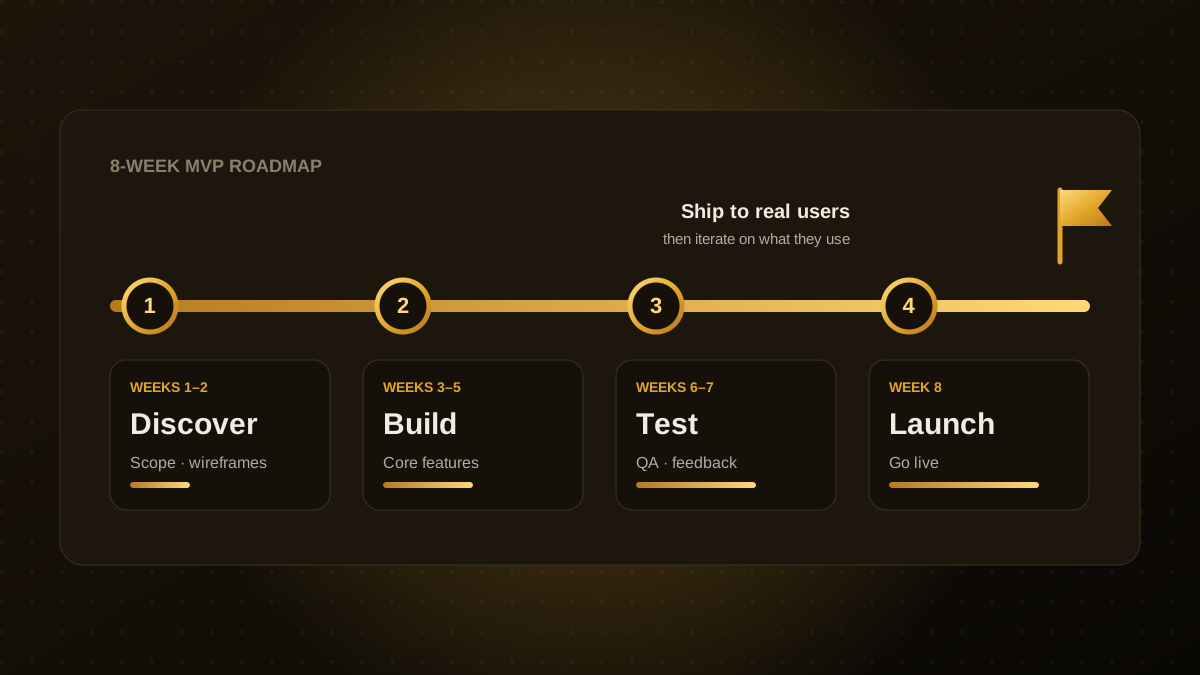
- A reliable rhythm is weeks 1 to 2 for scope and design, weeks 3 to 5 for building the core, weeks 6 and 7 for testing with real users, and week 8 for launch.
- Cut anything that does not support the core job. Admin dashboards, multi-language support and advanced reporting can usually wait.
- Launch is the start of learning, so budget time and money for iteration after release.
What an MVP is, and what it is not
A minimum viable product is the smallest version of a product that delivers real value to a real user and teaches you something about the market. The goal is learning, not completeness. A good MVP answers one question: will people use this to solve this problem?
An MVP is not a prototype that only looks like a product, and it is not a half-finished product full of bugs. It should be small, but it should work and feel trustworthy for the one thing it does.
The 8-week plan
| Weeks | Focus | What you have at the end |
|---|---|---|
| 1 to 2 | Discover and design | One-page scope, user flows, clickable wireframes, technical plan |
| 3 to 5 | Build the core | The main workflow working end to end, with login and data storage |
| 6 to 7 | Test and refine | Feedback from real users, bug fixes, performance and security checks |
| 8 | Launch | Production deployment, analytics, a support channel and a short post-launch plan |
Each stage ends with something you can see and use, so you never wait eight weeks to find out whether the project is on track. Weekly demos keep everyone aligned and surface problems while they are still cheap to fix.
Weeks 1 and 2: decide what you are building
Start by writing down the single job your user needs to get done, in one sentence. Then map the shortest path from sign-up to that outcome. Every screen and feature must earn its place on that path.
- Define the user. Pick one primary user type, not three.
- Define success. Choose one or two measurable outcomes, such as "a user completes a booking in under three minutes".
- Design before you code. Clickable wireframes let you test the idea with users before any engineering time is spent.
- Choose boring technology. Proven frameworks and managed services are faster and safer than novel stacks.
How to decide what to cut
Scope is the biggest lever on timeline. Sort every candidate feature into three groups: must have for the core job, nice to have, and later. Be strict. If a feature does not help a user complete the core job, it goes in the later pile.
Features that are commonly postponed without hurting the first release include multi-language support, complex roles and permissions, advanced analytics, native mobile apps, bulk import tools and deep third-party integrations. You can often handle these manually behind the scenes at first.
Weeks 3 to 5: build the core
Build the main workflow end to end before polishing anything. A thin version of the whole journey is more valuable than a perfect version of one screen. Work in one-week increments, demo working software at the end of each, and keep a short list of known issues instead of trying to finish everything at once.
Set up automated deployment and basic monitoring early. Releasing small changes often is far less risky than one large release in the final week.
Weeks 6 and 7: put it in front of real users
Invite five to ten people who match your target user and watch them try to complete the core job without help. You will find usability problems that no amount of internal review catches. Fix the issues that block the core job first, and write down the rest for after launch.
Use this window for the unglamorous essentials as well: security review, backups, error tracking, a privacy policy, and performance checks on a mid-range phone.
Common reasons MVPs slip
- Scope creep. New ideas arrive every week. Park them in a backlog and revisit after launch.
- Slow decisions. A question that waits a week for an answer costs a week. Name one decision maker.
- Building for imaginary users. Talk to real users in week 1, not week 8.
- Treating launch as the finish line. Plan the first month of improvements before you release.
What happens after launch
Once real people are using the product, watch what they do rather than what they say. Review analytics and support requests weekly, talk to a handful of users, and decide what to build next based on evidence. Many teams find that two or three focused improvement cycles after launch matter more than everything built before it.
If you are planning an MVP and want an honest view on scope and timeline, share your idea and we will tell you what we would build first and what we would leave out.

Qodexify is a remote-first team of senior engineers building web apps, AI agents, workflow automation and websites. Learn more about our web app development service or talk to an engineer.